• Staff Applications are OPEN! [ Staff / Moderator ] More Info HERE Help us make a better forum for everyone!

Broken Epubs - to fix

yano2mch

Professional Geeky Perv
I have multiple devices, and most don't have any problems. However, one of my primary ereaders is an older Nook model BNTV600 (at least until the battery is dead).

A problem coming is some epubs don't work, and i didn't have an answer why, except to drop said book and find another. BUT putting it in Calibre i think i finally have some some answers:

* Namespaces broken
* stylesheets with errors

If you have a epub you can't use in some device, i hope this is a place to determine the errors and fix them, and replace the public version for future use.
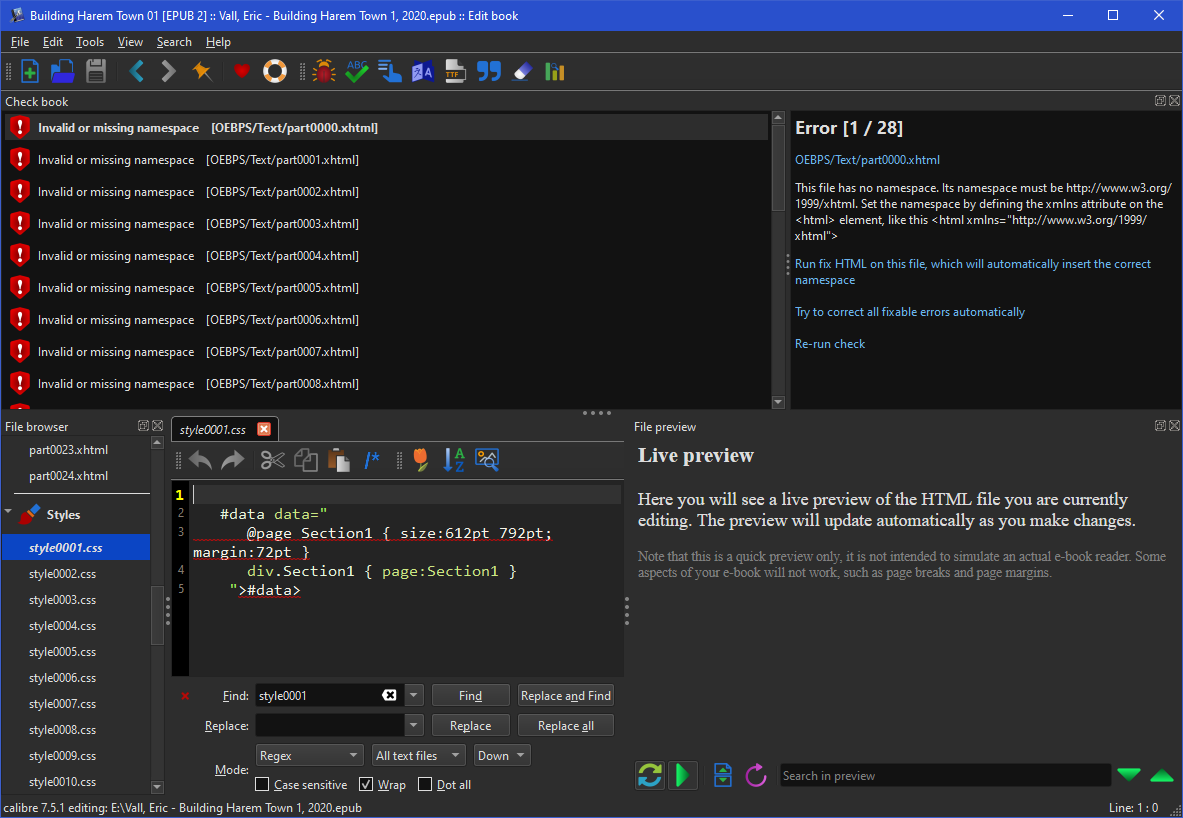
haremtown_1.png


Course additional fixes could be to reduce separator images as much as possible (I've seen a thousand separators of the same item scanned in with slight differences in location/zoom, or the same image exactly duplicated), same for stylesheets if they are duplicated.

I suppose worst case this can just be a discussion of how to fix said epubs as we find them. I stumble on them when i try to open them, not using a bulk tool to tell me which epubs are broken (since I'm not aware of one). Mind you I'm sure many modern ereader apps will work regardless, but I'd rather have clean epubs that work on as much as possible.

Curious the 'fix' doesn't take that much space as an xdelta (Just shy of 3000 bytes, probably smaller if i didn't reduce the duplicate css pages), though i doubt those would be in heavy use.

Provided book example in attachment: Arriande, Ace - Lazy Dragon Queen 1
 

Attachments

I'm brand new to most of this including epub. Many books show the title graphics twice, but the 2nd time its offset to the right, so only half of it is showing? Is that another way that an epub is damaged?
 
I'm brand new to most of this including epub. Many books show the title graphics twice, but the 2nd time its offset to the right, so only half of it is showing? Is that another way that an epub is damaged?

As i understand it, no.

I refer for damaged/broken epubs as ones you can't open or use at all. If the file was just corrupted (a few bytes out of alignment or a crc check failing) the archiver would probably notify you.. Badly done html doesn't necessarily constitute a broken epub. (some of my converted ebooks had every line as it's own paragraph... ugly and hard to read, word-wrap didn't work, but not broken as the html isn't malformed; Though i hopefully fixed all of my own...). For the example file(s) above (Lazy Dragon Queen, Harem Town 1) those literally won't render on my device. They probably render on another tablet or computer.


First my understanding is still limited, but from what i can gleam, there's usually a coverpage which you can put in, this is either identified with a 'cover' ID in the contents, or it's titlepage.xhtml or something similar. This is a quick access to determine which image is suppose to show when you can glance through your library.

content.opf - urelated stuff stripped for brevity for coverimage data.
HTML:
<package version="2.0" xmlns="http://www.idpf.org/2007/opf" unique-identifier="uid">
    <metadata xmlns:dc="http://purl.org/dc/elements/1.1/" xmlns:opf="http://www.idpf.org/2007/opf">
        <meta name="cover" content="x_my-cover-image" />
    </metadata>
    <manifest>
        <item id="x_ncx" media-type="application/xhtml+xml" href="Text/cover_page.xhtml" />
        <item id="x_my-cover-image" media-type="image/jpeg" href="Images/cover00318.jpeg" />
    </manifest>
    <guide>
        <reference type="toc" title="Table of Contents" href="Text/part0001.xhtml" />
        <reference type="cover" title="Cover" href="Text/cover_page.xhtml" />
    </guide>
</package>

The second one, usually is a normal page in the table of contents, it may be: Titlepage, startpage, tocx, story, etc. This is why you may see them twice. Also sometimes i see two copies of the cover image, a full page, and a mini-sized one. (sometimes they just have duplicates...)

As for only half of it being shown... Most generated images when put for cover pages and the like have the resolution baked into the page. But what if someone got a bad cover? They just go to amazon and download a different one and replace the cover image. Boom! Better image..... Except..... that it's still referring to the original size of the original image.

HTML:
    <svg xmlns="http://www.w3.org/2000/svg" height="100%" preserveAspectRatio="xMidYMid meet" version="1.1"
                viewBox="0 0 892 1262" width="100%" xmlns:xlink="http://www.w3.org/1999/xlink">
      <image height="1262" width="892" xlink:href="../Images/cover00318.jpeg"/>

Grabbing from the first epub i had on hand, this cover image is told the area of the image is suppose to be 892x1262. But if it were say 300x700, and then i replaced the image, then only the (upperleft?) 300x700 would be shown. Manually editing these pages after you get better ones is usually an afterthought.


but the 2nd time its offset to the right

Hmmm coming back to this, i'd need to see an example. I know setting the width option to be 100% fixes some of that as it forcibly scales the image. Before doing OCR work the Brandi Black books my GF was reading were impossible to read since the text was microscopic by default. And browsers will happily make the image go off the screen making you have to scroll it.
 
Last edited:
Here's one that was posted recently that has a very similar problem in okular: The first page has the title image offset -- the image starts halfway across the page and is cut off at the right border. The 2nd page shows the full title image.

Oohhh a book i was reading, though i combined them and rebuild from the text files...
During Extraction: Data error on style.css, not a good start...

Align center, height 100% instead of width 100%.... i don't see the usual view window coordinances...

I would harbor a bug in the display ereader where the centering has wrong offsetting, combined with height max. Not sure, only by doing several tests could we determine the exact cause. Though doing width 100% and dropping center would probably fix it.

I'd suggest getting my merging job where i put a bit more love into it already. Download A Neighbor's Delight

Regardless, i basically re-generated the coverpage using calibre.
 

Attachments

yano2mh,
WRT Katt Ford's 'Teaching Him A Lesson' project. (as you pointed out this is probably a better discussion area)
Anyone interested in following the discussion with find the start of it and the associated files in the Katt Ford thread.
I notice on more than one occasion you've removed:
'<meta http-equiv="Content-Type" content="text/html; charset=UTF-8"/>'
from the head section of the sub-files.
While it appears to have no effect on the file what was it supposed to do?

Also while I'm asking questions, why do you suppose I had to change
'<p class="calibre10">' to '<p class="calibre11">' to reduce the font size from some of the original files (I would have expected the opposite to be true)?
More later...
 
yano2mh,
I notice on more than one occasion you've removed:
'<meta http-equiv="Content-Type" content="text/html; charset=UTF-8"/>'
from the head section of the sub-files.
While it appears to have no effect on the file what was it supposed to do?

Actually i didn't remove those meta entries; Calibre did.

Though if you look at the first line of most of the files, the following line is present, which does the same thing.
<?xml version='1.0' encoding='utf-8'?>

As for what the data means, it is just an encoding of how to decode on a byte-level for characters.

Historically characters are 7 or 8bits in length, determining the values went to ASCII. That's fine and dandy, until you get to languages that need a lot more characters than can fit in the 256 range. You start getting larger types and standards.

Ultimately UTF-8 kinda became the accepted default format, as it's compatible with ASCII (well the 0-127 ASCII is but not Extended ASCII; while the 128-255 extends the size of the code and has special binary meanings), but also allows all those wonderful unicode characters, even those well above the 16bit range, and everyone uses it.

If you want a quick geeky lesson on how (that i understand) UTF-8 works I'll expand on that. But if you're working with normal text with nothing special, the utf-8 identifier doesn't add/do much. (though if it's edited later, it assumes utf-8 when it loaded and will add new unicode characters using that format...)

Also while I'm asking questions, why do you suppose I had to change
'<p class="calibre10">' to '<p class="calibre11">' to reduce the font size from some of the original files (I would have expected the opposite to be true)?
More later...

the listing in the stylesheet.css has the following
CSS:
.calibre10 {
    display: block;
    font-size: 1.66667em;
    font-weight: bold;
    line-height: 173%;
    page-break-after: avoid;
    page-break-inside: avoid;
    text-align: center;
    margin: 1.86% 0%
    }
.calibre11 {
    display: block;
    margin-bottom: 0%;
    margin-top: 0%;
    text-indent: 2em
    }

Now my HTML 4.0 and CSS is a hair rusty and i'd rather not pull out my big book; But the font-size in calibre10 says 1.66667em, assuming 1.0em is the 'default size' then that means it's half again larger in calibre10, while calibre11 just has a slight indentation/margin notation.

If you want to change a single line size, you can do the following (old school) format of <font size="+2">text</font>. the +/- will adjust based on the current size is, vs a fixed size. So if you are viewing at 16, it will probably be 18 for that text (i think...).
 
Last edited:
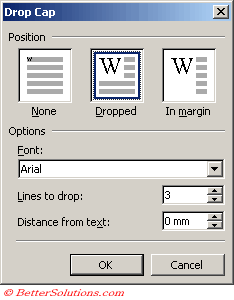
While we're on the topic of CSS, i've been adding the following to my OCR ones to support Drop Cap.

CSS:
.first-letter {
    -webkit-line-box-contain: block inline replaced;
    float: left;
    font-size: 375%;
    font-style: normal;
    font-weight: normal;
    margin-bottom: -0.20em;
    margin-top: -0.15em;
    margin-right: 0.10em;
    text-transform: uppercase
    }

This is used when you want to use DropCap . To use it I've been doing <div class="first-letter">X</div>

Drop Cap​

A drop cap is a large letter that begins a paragraph and drops through several lines of text.
Select (Format > Drop Cap).

dropcap-dialog.png
 
When you said Calibre deleted those meta lines...?
Did you use a proofing function I didn't find, or ...

Calibre10 to 11 was the style sheet, not the font size - okay kinda like a call or subroutine function, did not realize that.
Drop Cap - very interesting...

Can't believe I missed a whole section in the TOC
 
Last edited:
I noticed in my Part0004_split_008.html
my lioness picture doesn't show - and when I look at the html itself it is almost as if it doesn't recognize my '../' pathway because many of the links don't highlight bright blue, but I don't see where that path information is present in yours but not in mine... Where would that break be?
 
When you said Calibre deleted those meta lines...?
Did you use a proofing function I didn't find, or ...

I can only assume that's the case. I'll assume it happened when i told it to move/organize html's into the 'text' directory, and it took liberties removing unneeded stuff while it was modifying the content, or when the TOC was being generated as it added ID's in.

Calibre10 to 11 was the style sheet, not the font size - okay kinda like a call or subroutine function, did not realize that.
Drop Cap - very interesting...

Can't believe I missed a whole section in the TOC

Back before HTML 4, you put formatting per tag and per line. That resulted in a lot of.... very verbose formatting when you wanted a style (and some stories online being 80% formatting and html tags, and 20% content)., and then it was hard to edit and easy to miss things; Style-sheets apply styles based on an id or per the per-defined tags. As long as you link to the style sheet, any tag you specify a style is applied.

To generate a TOC page, the Tools->Table of contents->Edit TOC, will edit the Ereader and main TOC data. While the 'insert inline' has the effect of making you a toc.xhtml file for however the current TOC looks.

I usually generate from header tags (h1, h2, h3, etc).

I noticed in my Part0004_split_008.html
my lioness picture doesn't show - and when I look at the html itself it is almost as if it doesn't recognize my '../' pathway because many of the links don't highlight bright blue, but I don't see where that path information is present in yours but not in mine... Where would that break be?

I ended up putting the images to a folder. I also renamed the lioness image to 'lioness.jpeg'.

From the text folder (assuming you didn't move the html files), you want it to say '../images/lioness.jpeg', and it should show up.

Though if we're talking yours rather than mine... drop the ../, that's for parent directory and you're already at the base directory, all the ../ in yours (other than text directory) were broken.
 
Last edited:
Can you please check this for me. At yano2mch.
This one also please.

Looking at first glance, i see a major problem, and that's the story (4-5mb) is all in a single html file. A lot of readers prefer 200k or less, meaning it may just be having issues loading the damn thing. Don't worry splitting is easy using calibre editor.

I'll check back in about 20 minutes, assuming nothing else is the problem i'll upload the updated files.

Edit: What the fuck???

Hmmm i get the feeling i'll be working on these two for a little while... fixing whatever this is. Should be easy bulk-replace but it explains why calibre was barfing during analysis.... It also explains the absurd size.

bloodline.png
 
Last edited:

Similar threads

  • Question Question
Replies
0
Views
310
  • Question Question
  • Technical Tags Technical Tags book
  • Character Tags Character Tags maid
  • Sexual/Kinks Tags Sexual/Kinks Tags netorare
Replies
0
Views
262
  • Question Question
Replies
1
Views
228
Back
Top Bottom