

Professor Sinister
Ill-behaved Apparently...
There are many broad usage tools that will allow you to download images from a XenForo forum but it's easy to get confused as to wether or not you have selected the right images and not mixed any images in different folders. That was one of my main issues. I would send all images to a certain folder named after the comic and then would forget to change it and ended up with multiple comics in the same folder, all with similar, non-descript names.
My friend Chikan72 shared his Tufos/Welcomix userscript (along with many others) with me on his Discord and it opened my eyes to the possibilities.
So i wrote a script that will take images attached to a XenForo Forum post and download them into a .cbz Comic Book Archive. Well, i say XenForo but it actually only works for APCx and F95zone. It can easily be adapted to work on other XenForo forums.
Here is what it looks like in action:
To use a Userscript, you need a Userscript manager like Violentmonkey or Tampermonkey
I use Violentmonkey because it is open-source, while Tampermonkey is closed source
Once you install one of the 2 in your browser, you can create a new script and copy-paste my script in there and save it.
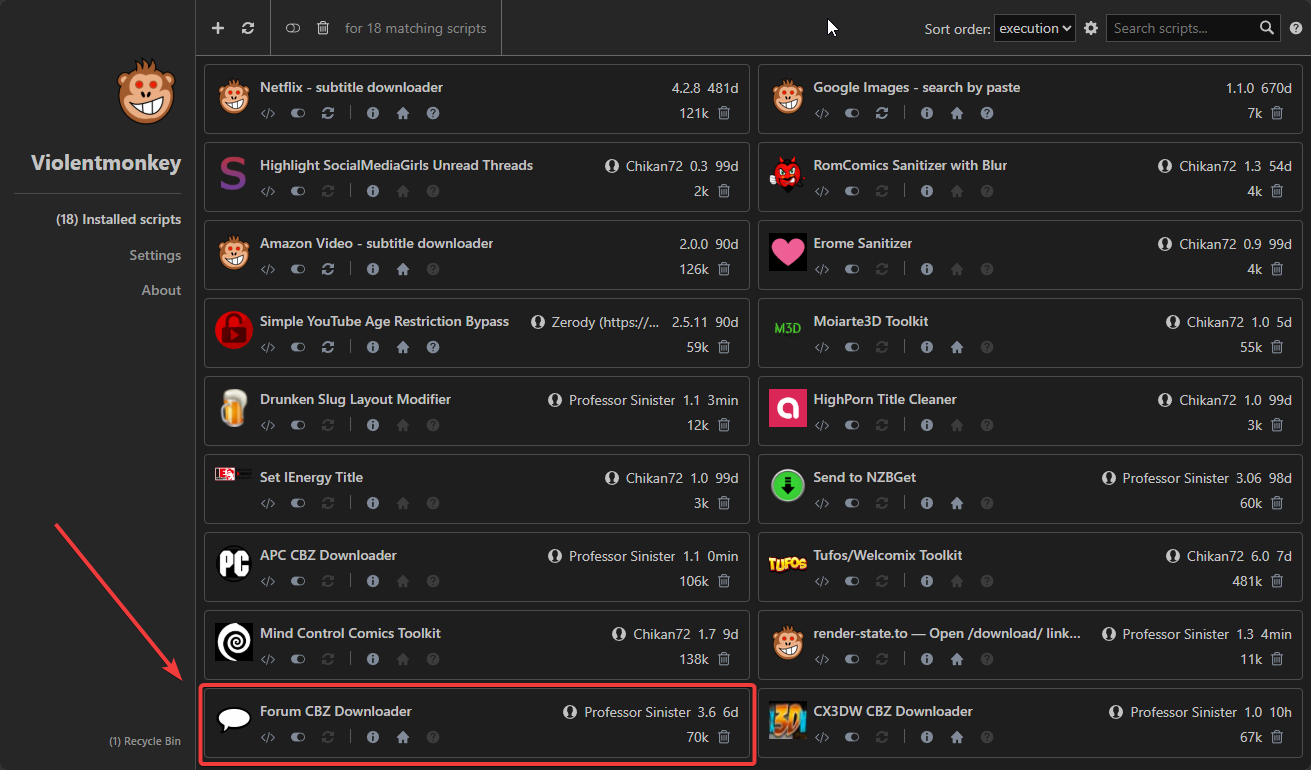
Make sure it's enabled and then you simply need to reload any threads on here or F95 to see the floating circle. Click on it to see the panel.
Quick tour:
Please don't ask me to add a feature to download as loose images. There are dozens of tools to do that.
I have been using it here and there for a while now and i ironed out the bugs i found but if you do find one, let me know here and i can fix them.
Here is the actual script:
https://paste.bbtools.ca/?3c15fd1da17da0d0#2mHDyFx7Ek1JoT5gZVjwQcMBVgzyqqNoB5wiXahmQuQn
My friend Chikan72 shared his Tufos/Welcomix userscript (along with many others) with me on his Discord and it opened my eyes to the possibilities.
So i wrote a script that will take images attached to a XenForo Forum post and download them into a .cbz Comic Book Archive. Well, i say XenForo but it actually only works for APCx and F95zone. It can easily be adapted to work on other XenForo forums.
Here is what it looks like in action:
To use a Userscript, you need a Userscript manager like Violentmonkey or Tampermonkey
I use Violentmonkey because it is open-source, while Tampermonkey is closed source
Once you install one of the 2 in your browser, you can create a new script and copy-paste my script in there and save it.
Make sure it's enabled and then you simply need to reload any threads on here or F95 to see the floating circle. Click on it to see the panel.
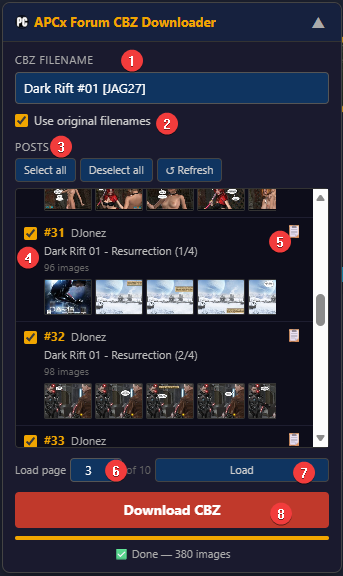
Quick tour:
- Name of the .cbz archive that will be generated (without the extension)
- Use the same image name as the uploaded ones. If not, images will be named 001, 002, 003, etc... CBZ readers sort the images by filename so if they have random names that won't sort in the right order, uncheck this to make sure your pages are ordered properly
- You can select or deselect all and refresh the list
- The main area where you get post details and you can select individual posts. Only posts with images are shown.
- Click this to copy the text to the CBZ filename
- Next page to be loaded. Automatically set to the next page but you can manually override it to go to a different page.
- Load the page set in the load page box
- Download all the checked posts to the single .cbz defined in field 1.
Please don't ask me to add a feature to download as loose images. There are dozens of tools to do that.
I have been using it here and there for a while now and i ironed out the bugs i found but if you do find one, let me know here and i can fix them.
Here is the actual script:
https://paste.bbtools.ca/?3c15fd1da17da0d0#2mHDyFx7Ek1JoT5gZVjwQcMBVgzyqqNoB5wiXahmQuQn


